
Hi, Readers.
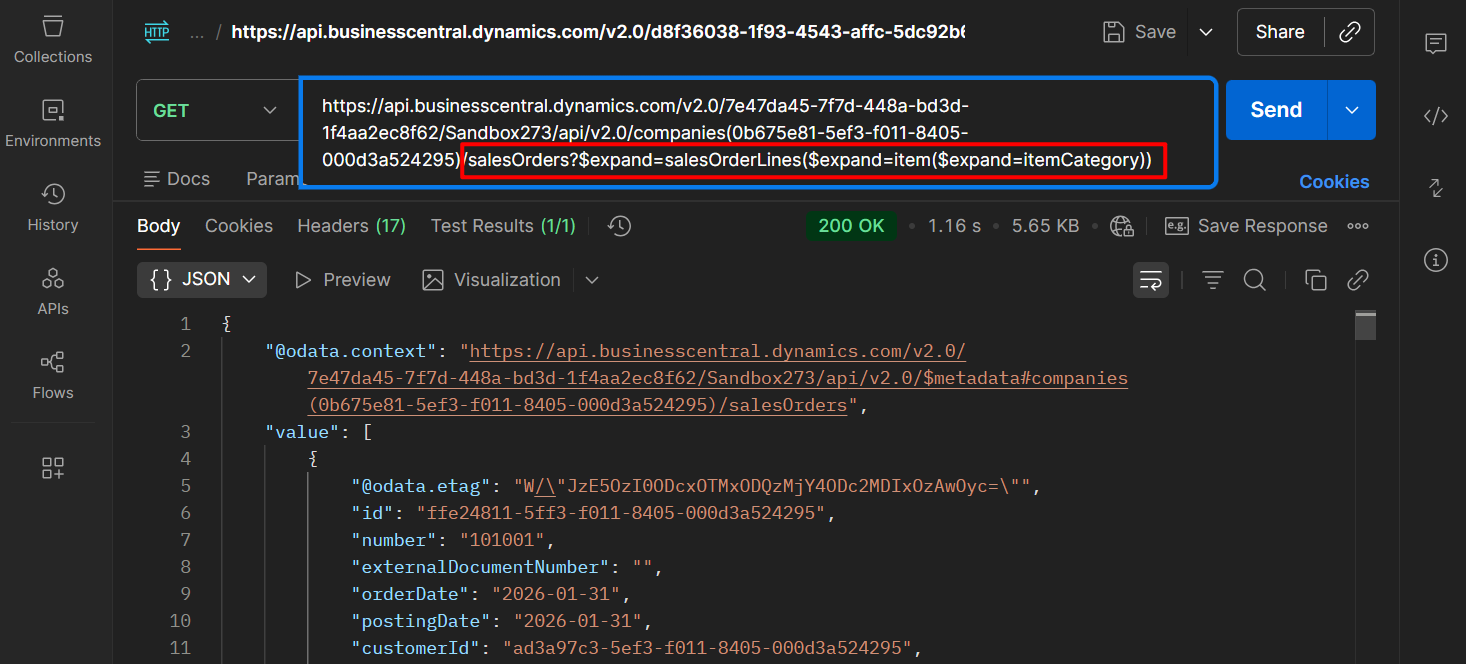
Today I would like to discuss a question I was asked recently, does the BC API support Multi-level Expand?
With Business Central you can create Connect apps. Connect apps establish a point-to-point connection between Dynamics 365 Business Central and a 3rd party solution or service and is typically created using standard REST API to interchange data. More details: Welcome to the API (v2.0) for Business Central
For example, salesOrder resource type (standard API): Represents a sales order in Business Central.
Endpoint:
https://api.businesscentral.dynamics.com/v2.0/c8558e71-6ad8-4fcd-9f29-3ca165b41bbe/Sandbox240/api/v2.0/companies(37052e92-60e6-ee11-a200-6045bdac9711)/salesOrders
In this standard API, we can use some navigation, which can expand the next layer of data.
Navigation:
| Navigation | Return Type | Description |
|---|---|---|
| customer | customer | Gets the customer of the salesOrder. |
| dimensionValue | dimensionValue | Gets the dimensionvalue of the salesOrder. |
| currency | currency | Gets the currency of the salesOrder. |
| paymentTerm | paymentTerm | Gets the paymentterm of the salesOrder. |
| shipmentMethod | shipmentMethod | Gets the shipmentmethod of the salesOrder. |
| dimensionSetLines | dimensionSetLines | Gets the dimensionsetlines of the salesOrder. |
| salesOrderLines | salesOrderLines | Gets the salesorderlines of the salesOrder. |
| attachments | attachments | Gets the attachments of the salesOrder. |
| documentAttachments | documentAttachments | Gets the documentattachments of the salesOrder. |
$expand: Retrieves related resources.
Let’s see two examples.
customer:
https://api.businesscentral.dynamics.com/v2.0/c8558e71-6ad8-4fcd-9f29-3ca165b41bbe/Sandbox240/api/v2.0/companies(37052e92-60e6-ee11-a200-6045bdac9711)/salesOrders?$expand=customer
https://api.businesscentral.dynamics.com/v2.0/c8558e71-6ad8-4fcd-9f29-3ca165b41bbe/Sandbox240/api/v2.0/companies(37052e92-60e6-ee11-a200-6045bdac9711)/salesOrders?$expand=salesOrderLines
The examples above are all single-level (layer). Does the BC API support Multi-level (Multi layers)? Yes, of course. Let’s take a look at a few more examples.
salesOrders -> salesOrderLines -> item:
https://api.businesscentral.dynamics.com/v2.0/7e47da45-7f7d-448a-bd3d-1f4aa2ec8f62/Sandbox273/api/v2.0/companies(0b675e81-5ef3-f011-8405-000d3a524295)/salesOrders?$expand=salesOrderLines($expand=item)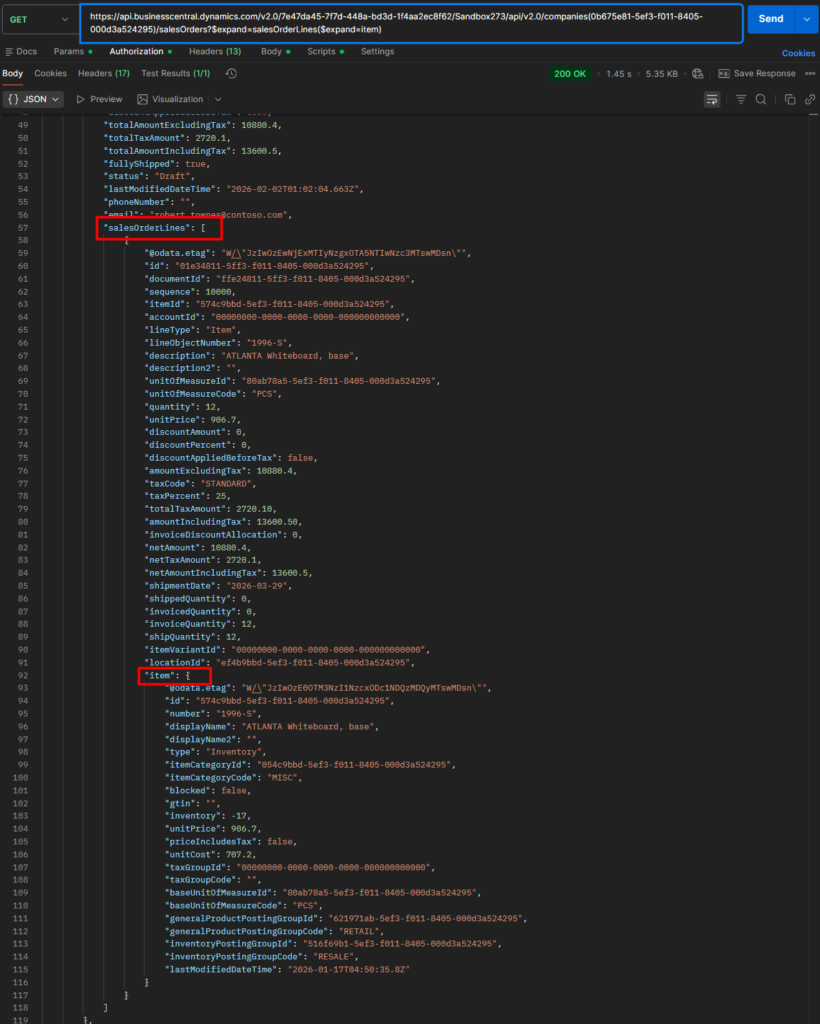
salesOrders -> salesOrderLines -> item -> itemCategory:
https://api.businesscentral.dynamics.com/v2.0/7e47da45-7f7d-448a-bd3d-1f4aa2ec8f62/Sandbox273/api/v2.0/companies(0b675e81-5ef3-f011-8405-000d3a524295)/salesOrders?$expand=salesOrderLines($expand=item($expand=itemCategory))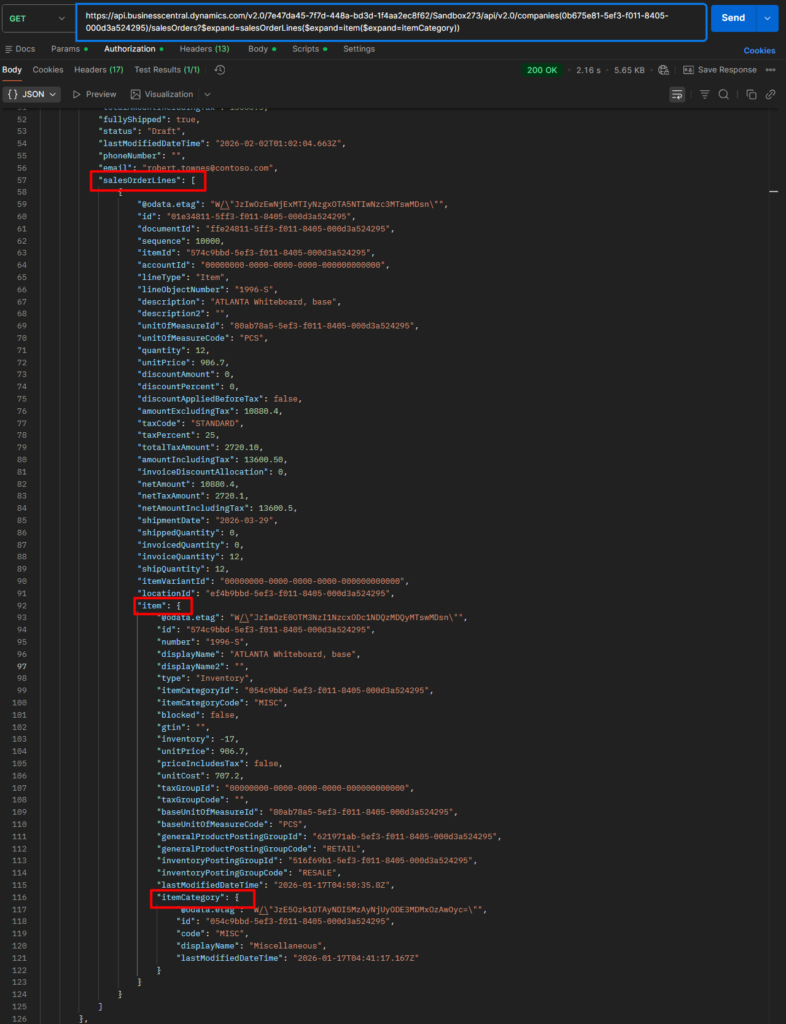
Therefore, each additional level of expansion requires an extra set of parentheses: $expand=salesOrderLines($expand=item($expand=itemCategory))
You can also expand multiple entities simultaneously, such as combining a two-level expand with a multi-level (three-level) nested expand.
https://api.businesscentral.dynamics.com/v2.0/7e47da45-7f7d-448a-bd3d-1f4aa2ec8f62/Sandbox273/api/v2.0/companies(0b675e81-5ef3-f011-8405-000d3a524295)/salesOrders?$expand=paymentTerm,salesOrderLines($expand=account,item($expand=itemCategory))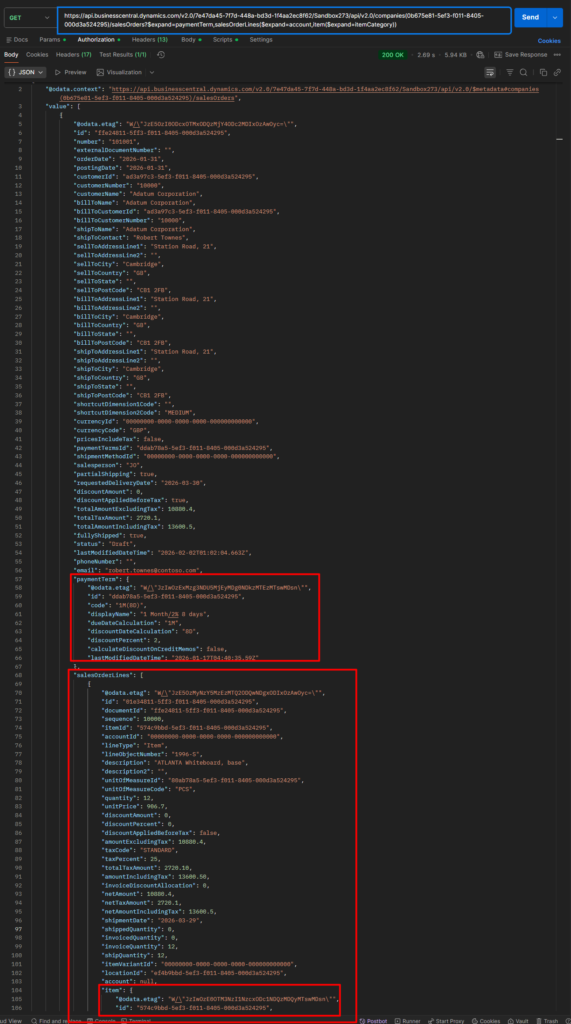
This also allows you to add filter expressions. More details: Dynamics 365 Business Central: How to use filter expressions in API related resource ($expand)
https://api.businesscentral.dynamics.com/v2.0/7e47da45-7f7d-448a-bd3d-1f4aa2ec8f62/Sandbox273/api/v2.0/companies(0b675e81-5ef3-f011-8405-000d3a524295)/salesOrders?$filter=orderDate ge 2026-01-01&$expand=paymentTerm,salesOrderLines($expand=account,item($expand=itemCategory))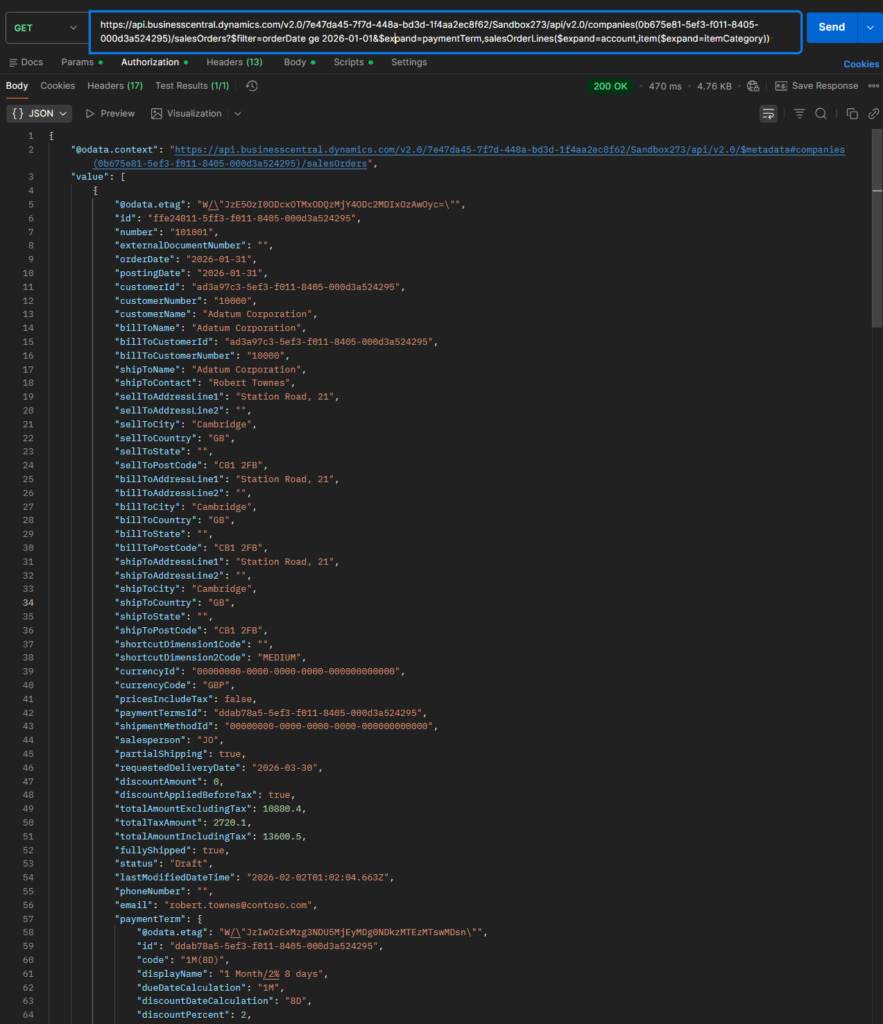
https://api.businesscentral.dynamics.com/v2.0/7e47da45-7f7d-448a-bd3d-1f4aa2ec8f62/Sandbox273/api/v2.0/companies(0b675e81-5ef3-f011-8405-000d3a524295)/salesOrders?$select=number,postingDate&$expand=paymentTerm($select=code,displayName),salesOrderLines($select=lineObjectNumber;$expand=account,item($select=displayName;$expand=itemCategory))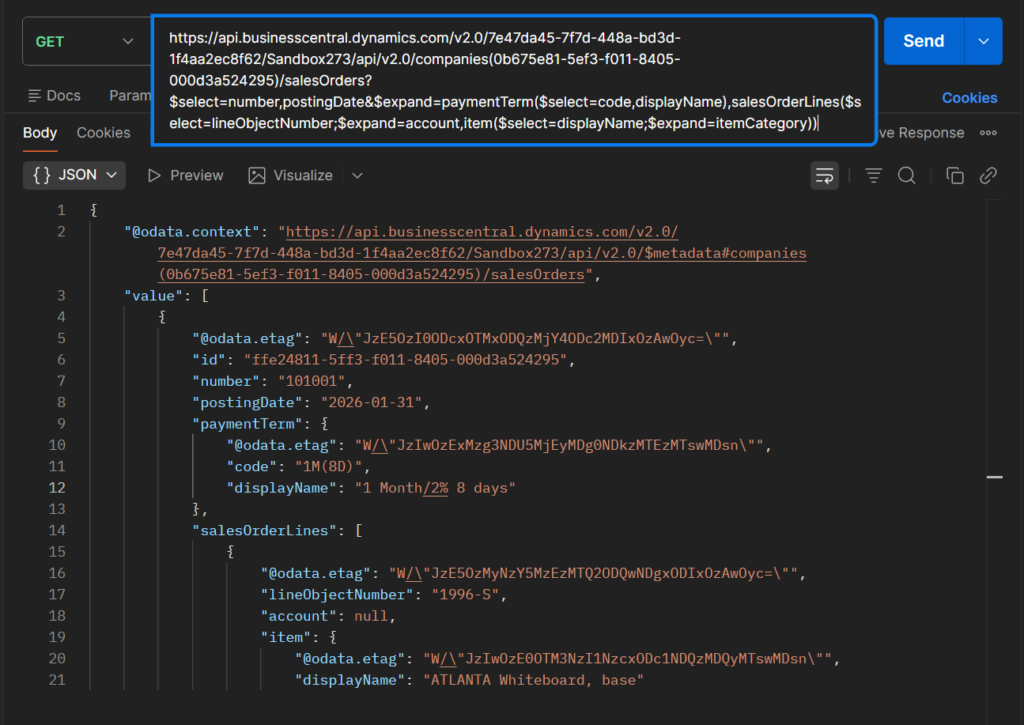
Great. Give it a try!!!😁
PS: Dynamics 365 Business Central Blog Series: REST API web services (APIs)
END
Hope this will help.
Thanks for reading.
ZHU

コメント