

Hi, Readers.
The public preview for Dynamics 365 Business Central 2025 release wave 2 (BC27) is available. Learn more: Link.
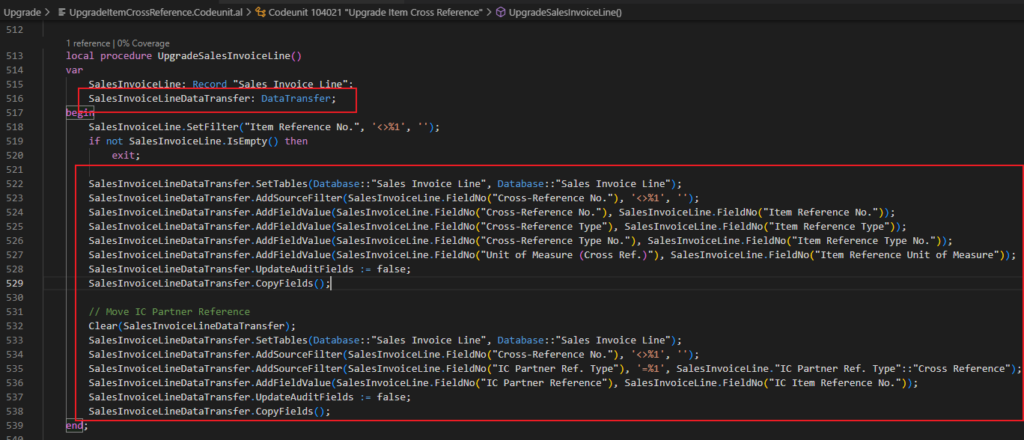
I will continue to test and share some new features that I hope will be helpful. In this post, I would like to talk about UpdateAuditFields on DataTransfer is now in Cloud scope.
This new feature is not yet documented in the Business Central 2025 release wave 2 (BC27) release plan but is mentioned in AL Language extension changelog Version 16.0.
Changelog | Visual Studio Marketplace
UpdateAuditFieldsonDataTransferis now in Cloud scope.

The DataTransfer Data type is a new language construct introduced in Business Central 2022 wave 2 (BC21). developers can write faster upgrade code when they want to move a field (with data) from one table to another or when they want to copy all data from one table to another.
More details:
Business Central 2022 wave 2 (BC21) new features: Developers can write faster upgrade code (New DataTransfer data type)

And, every table in Business Central includes the following four system fields, which can be used for auditing records: Data audit fields
| Field name (in AL) | Column name (in database) | Data type | Field number | Description |
|---|---|---|---|---|
| SystemCreatedAt | $systemCreatedAt | DateTime | 2000000001 | Specifies the data and time that the record was created. |
| SystemCreatedBy | $systemCreatedBy | GUID | 2000000002 | Specifies security ID (SID) of the user that created the record. |
| SystemModifiedAt | $systemModifiedAt | DateTime | 2000000003 | Specifies the data and time that the record was last modified. |
| SystemModifiedBy | $systemModifiedBy | GUID | 2000000004 | Specifies the SID of the user that last modified the record |
Note:
You can assign the values, but the values written to the database are always provided by the platform.
Audit fields can’t be imported with configuration packages.
The platform won’t populate audit field values in these cases:
- Copying company. The values in the tables of the company being copied stay the same, and the values are copied to the tables of the new company.
- Synchronizing the table schema with the application.
As of now, we can use the following method to control whether to update Audit Fields when transferring data using DataTransfer.
DataTransfer.UpdateAuditFields([Boolean]) Method: Sets if audit fields should be updated. If the value is set to false, the audit fields are not updated when calling the CopyFields method. Default value is true.

The application object or method ‘UpdateAuditFields’ has scope ‘OnPrem’ and cannot be used for ‘Extension’ development. AL AL0296

With this wave (BC v27, runtime: “16.0”), this has changed. UpdateAuditFields Method on DataTransfer is now in Cloud scope.🎉🎊🎆

Great, give it a try!!!😁
END
Hope this will help.
Thanks for reading.
ZHU
コメント