

Hi, Readers.
The public preview for Dynamics 365 Business Central 2025 release wave 2 (BC27) is available. Learn more: Link.
I will continue to test and share some new features that I hope will be helpful. In this post, I would like to talk about Understand how each Copilot and agent capability is billed.
Understand how each Copilot and agent capability is billed:
Business value:
https://learn.microsoft.com/en-us/dynamics365/release-plan/2025wave2/smb/dynamics365-business-central/understand-how-each-copilot-agent-capability-billed?wt.mc_id=DX-MVP-5004336
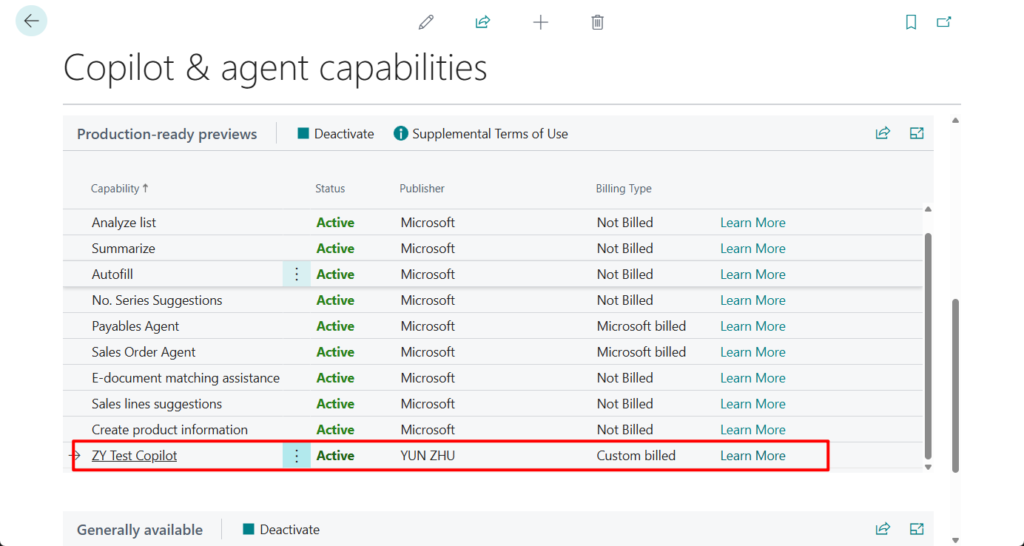
With the introduction of the interactive Copilot as well as agent features and capabilities, both from Microsoft and partners, it can be a challenge to get an overview of which of these are billed based on consumption and by who. To help, we’re introducing a new Billing Type column in the Copilot and Agent Capabilities page, indicating whether consumption billing is handled by Microsoft or a partner, or if the feature isn’t consumption-billed.
Copilot is an AI-powered assistant that helps spark creativity, boost productivity, and eliminate tedious tasks. Copilot in Business Central is the world’s first AI-powered assistant across all lines of business. With Copilot in Business Central, small and medium-sized organizations empower their workers through intuitive AI tools that boost creativity and save time.
With this wave (BC27), a new Billing Type column is added in the Copilot and Agent Capabilities page.
Billing Type
Specifies the billing type of this Copilot.
Copilot Capabilities Preview (7773, ListPart):

Copilot Capabilities GA (7774, ListPart):
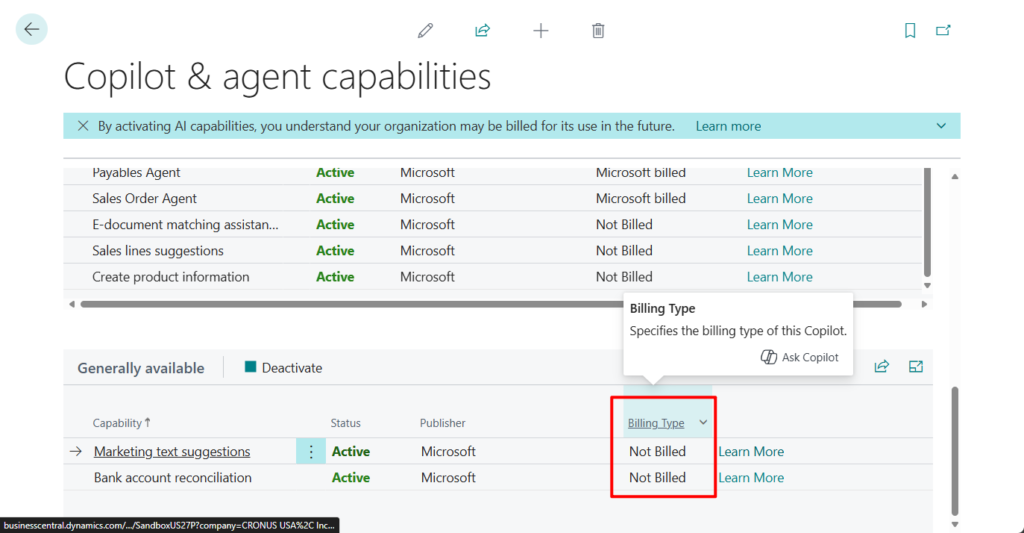
This indicates whether consumption is billed by Microsoft, custom-billed by a partner, or not consumption-billed. A capability can be billed by Microsoft either if it’s delivered by Microsoft, or if the partner building the capability has chosen to opt in to using Business Central AI resources. Learn more in Business Central AI resources.
PS: Is Copilot free?
Yes, Copilot in Business Central is included with your Business Central license at no extra cost. However, fair-use policies, quotas, or pricing might be introduced later.
https://learn.microsoft.com/en-us/dynamics365/business-central/copilot-overview?wt.mc_id=DX-MVP-5004336#is-copilot-free

Below is the standard code for this field.
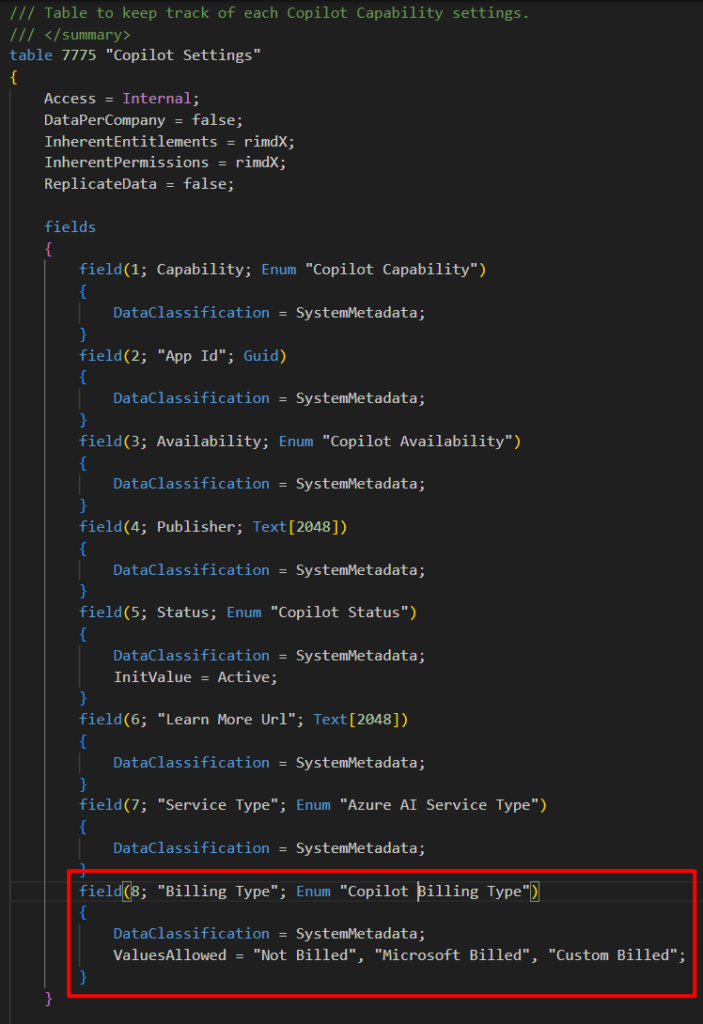
| Not Billed | The Copilot Capability is in free. |
| Microsoft Billed | The Copilot Capability is billed by Microsoft. |
| Custom Billed | The Copilot Capability is billed by partner/publisher. |
| Undefined | UnDefined, only for internal use. |
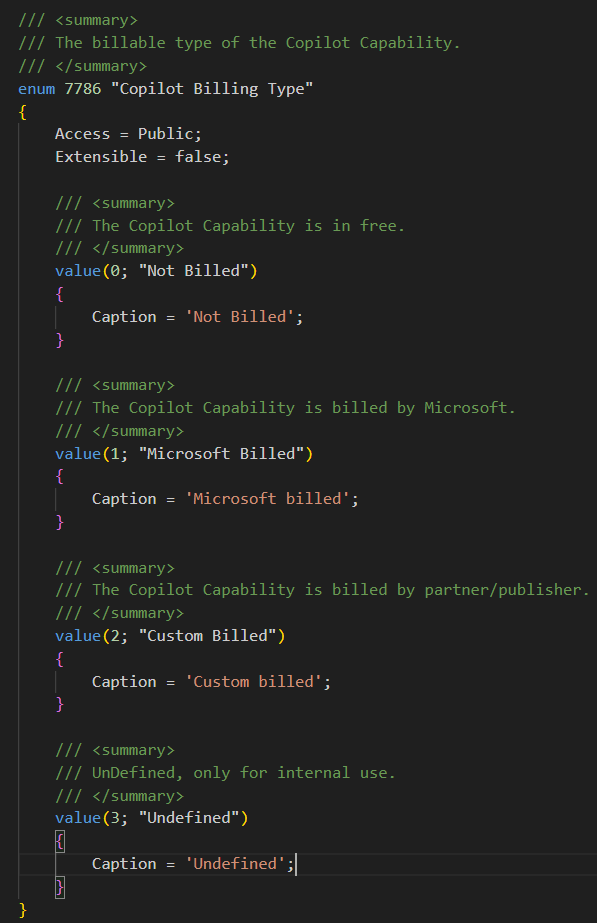
The billing information is set up manually by the app developer—it’s not automatically inferred at runtime. Therefore, it’s up to the developer to ensure that the correct billing type is set in the app and also corresponds to what actually happens. The billing type can be set in the RegisterCapability() and ModifyCapability() procedures. For example,
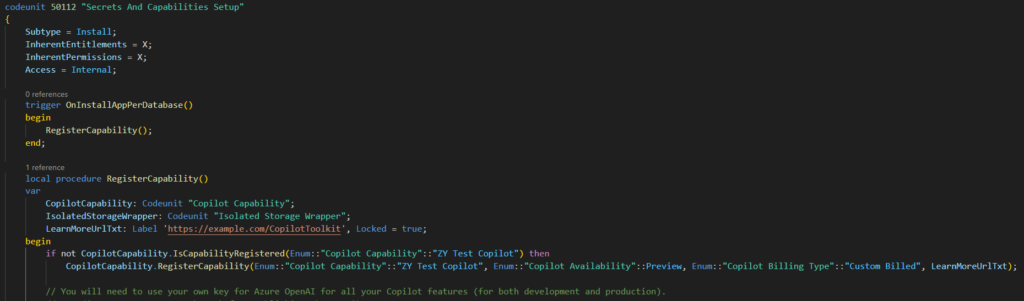
PS:
Method ‘RegisterCapability’ is marked for removal. Reason: Using RegisterCapability now requires additional input parameter, BillingType. Use the other overload for RegisterCapability instead.. Tag: 27.0.AL AL0432

More details: Dynamics 365 Business Central: PromptDialog page type (Integrate copilot capabilities)
Great, give it a try!!!😁
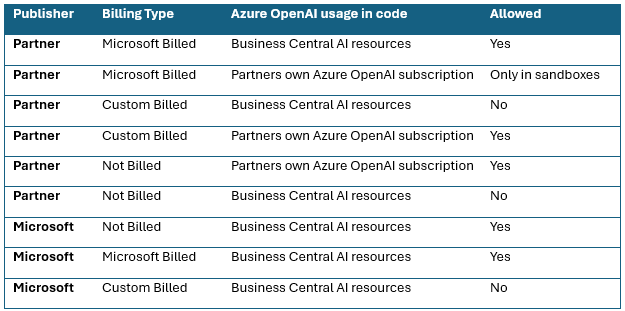
PS: At runtime, the billing type setting is validated against which Azure OpenAI resources the capability actually tries to use. Partners will likely use their own Azure OpenAI subscription during development, testing, and troubleshooting, but might opt in to use Business Central AI resources in customer production environments. Therefore, there may be some inconsistency in the defined billing type for the app versus the actual API call to Azure OpenAI in sandboxes.
The following table summarizes the supported combinations. If the combination isn’t allowed, the user gets an error message that usage of AI resources isn’t authorized with the chosen billing type.
END
Hope this will help.
Thanks for reading.
ZHU

コメント