

Hi, Readers.
Today I would like to briefly talk about a qustion I saw in the Dynamics 365 Community before, the AL Table Proxy Generator is distributed in the Microsoft.Dynamics.BusinessCentral.Development.Tools.Altpgen NuGet package (altpgen.exe missing from AL Language extension), more details: altpgen.exe missing from AL Language extension 18.x. Is the NuGet package the supported way?
As you might know, to integrate data from a Microsoft Dataverse table into Business Central, you must create a table object in Business Central that is based on the Microsoft Dataverse table, and then import the new table into the Business Central database.
The AL Table Proxy Generator tool can be used to generate one or more tables for integration with Microsoft Dataverse. When one or more tables are present in Microsoft Dataverse, but not in Dynamics 365 Business Central, the tool can be run to generate integration or proxy tables for the specified table or tables. More details: Using AL Table Proxy Generator tool to create an integration table in Business Central for the Dataverse table
An integration or proxy table is a table that represents a table in Microsoft Dataverse. The integration table includes fields that correspond to columns in the Microsoft Dataverse table. The integration table acts as a link or connector between the Business Central table and the Microsoft Dataverse table.
The AL Table Proxy Generator tool was available with the AL Language extension before. Look for the altpgen.exe tool in the equivalent folder of c:\users\<username>\.vscode\extensions\<al extension version>\bin. (Or C:\Users\yzhu\.vscode\extensions\ms-dynamics-smb.al-13.0.921843\bin\win32\altpgen)
For example: C:\Users\yzhu\.vscode\extensions\ms-dynamics-smb.al-7.4.496506\bin
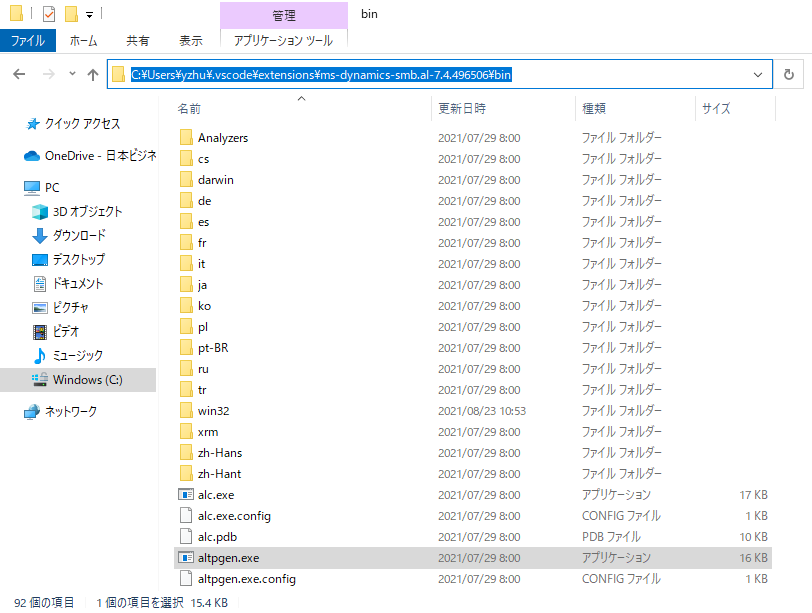
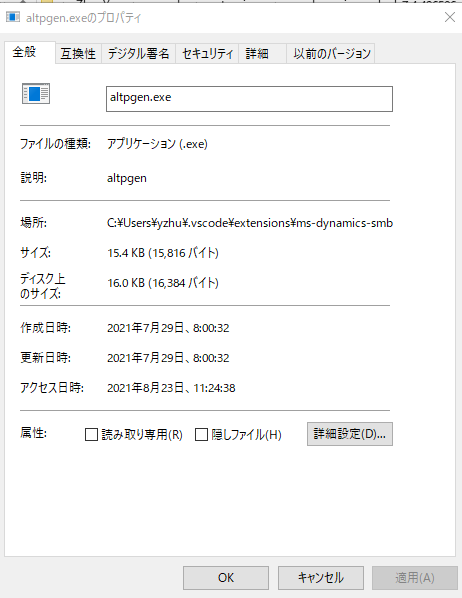
However, in recent versions, this file has been removed from the AL Language extension.

Why? The AL Table Proxy Generator is distributed in the Microsoft.Dynamics.BusinessCentral.Development.Tools.Altpgen NuGet package now. More details: Create proxy tables for Dataverse
What is NuGet?: Create .NET apps faster with NuGet
NuGet is the package manager for .NET. The NuGet client tools provide the ability to produce and consume packages. The NuGet Gallery is the central package repository used by all package authors and consumers.

You can now find this tool at the following link: Microsoft.Dynamics.BusinessCentral.Development.Tools.Altpgen

As for how to use it, it’s very straightforward, we can start by downloading it. (You don’t need a .NET project or a dotnet tool install.)


After extraction, you will find net10.0 and net8.0 folders inside the lib folder, both containing the altpgen.exe file. Choose which one to use based on the .NET version installed on your system.


Next, let’s run a quick test. For more details, you can also refer to the post below.
Business Central 2024 wave 1 (BC24): Changes to AL Table Proxy Generator tool (altpgen) – Two additional arguments: ClientId and RedirectUri
First, I created a new Power Platform environment and linked it to Business Central.


Then, I created two new tables in both Business Central and Dataverse.


Next, we need to register a new app for authentication in Azure Portal-> App registrations.

Authentication:

API permissions:

With everything set up, we can now run the Command Prompt as an administrator.

Navigate to the directory where the downloaded altpgen.exe file is located.
cd C:\Users\yzhu\Downloads\microsoft.dynamics.businesscentral.development.tools.altpgen.30.0.44.47290-beta\lib\net8.0-windows7.0
Done.

Run the following command:
.\altpgen -project:"C:\Users\yzhu\Documents\AL\Reports" -packagecachepath:"C:\Users\yzhu\Documents\AL\Reports\.alpackages" -serviceuri:"https://org593c4ac3.crm7.dynamics.com/" -entities:cr2e6_labbook -baseid:50100 -tabletype:CDS -clientid:"6998ba67-fb81-4deb-85c9-bf98fd35ecc5" -redirecturi:"msal6998ba67-fb81-4deb-85c9-bf98fd35ecc5://auth"
Done.


Aside from re-downloading the tool file, the overall process remains unchanged from before. I hope you find this helpful!
PS:
1. The app registered in the Azure Portal must support multi-tenant.
Authenticating Dataverse using ServiceUri=https://org593c4ac3.crm7.dynamics.com/
Authentication failure. Reason: One or more errors occurred. (AADSTS50194: Application ‘6998ba67-fb81-4deb-85c9-bf98fd35ecc5′(BC29 ALTPGEN Test) is not configured as a multi-tenant application. Usage of the /common endpoint is not supported for such applications created after ’10/15/2018′. Use a tenant-specific endpoint or configure the application to be multi-tenant. Trace ID: 3a112bbe-7507-4097-8fc6-b2f73b8bdf00 Correlation ID: 29e7cbd2-76e9-48ec-aa71-814eef82c3b2 Timestamp: 2026-10-26 04:11:51Z)
error CDS0001: Error connecting to Dataverse.
Microsoft.Dynamics.Nav.Xrm.Common.XrmException: Failed to connect to Dataverse
at Microsoft.PowerPlatform.Dataverse.Client.ServiceClient.CreateServiceConnection(Object externalOrgServiceProxy, AuthenticationType requestedAuthType, String hostName, String port, String orgName, NetworkCredential credential, String userId, SecureString password, String domain, String Geo, String claimsHomeRealm, Boolean useSsl, Boolean useUniqueInstance, OrganizationDetail orgDetail, String clientId, Uri redirectUri, PromptBehavior promptBehavior, OrganizationWebProxyClientAsync externalOrgWebProxyClient, String certificateThumbPrint, StoreName certificateStoreName, X509Certificate2 certificate, Uri instanceUrl, Boolean isCloned, Boolean useDefaultCreds, Version incomingOrgVersion, ILogger externalLogger, String tokenCacheStorePath)
at Microsoft.PowerPlatform.Dataverse.Client.ServiceClient..ctor(Uri instanceUrl, Func`2 tokenProviderFunction, Boolean useUniqueInstance, ILogger logger)
at Microsoft.Dynamics.Nav.Xrm.XrmService.<>c__DisplayClass11_0.b__0()
at Microsoft.Dynamics.Nav.Xrm.Common.XrmHelper.ExecuteXrm(Action action)


2. Make sure the Dataverse table name matches the exact case, or it won’t be found.
Authenticating Dataverse using ServiceUri=https://org593c4ac3.crm7.dynamics.com/
Authenticated.
Retrieving entity metadata.
error CDS0002: Unable to retrieve metadata for ‘cr2e6_LabBook’. Reason: Could not find an entity with name cr2e6_LabBook and id 00000000-0000-0000-0000-000000000000 (2417166)..


END
Hope this will help.
Thanks for reading.
ZHU


コメント