

Hi, Readers.
Dynamics 365 Business Central 2026 wave 2 (BC29) is generally available. More details: General Availability: Dynamics 365 Business Central 2026 release wave 2 (BC29).
I will continue to test and share some new features that I hope will be helpful. In this post, I would like to talk about Faster data loading with improved data model for table extensions (all fields on an AL table are stored in the same table).
Faster data loading with improved data model for table extensions:
With the new data model for table extensions, all fields on an AL table are stored in the same table in the database.
This gives faster performance on all database operations that involve table extensions.
https://www.microsoft.com/en-us/microsoft-365/roadmap?id=573332

In Business Central 2023 wave 2 (BC23), Microsoft introduced a new data model for table extensions that combines all extension fields into a single companion table per base table. This reduces SQL JOINs to a maximum of one, significantly boosting performance in multi-extension environments. More details: Business Central 2023 wave 2 (BC23): New Data model for table extensions (Better performance when working with multiple extensions)
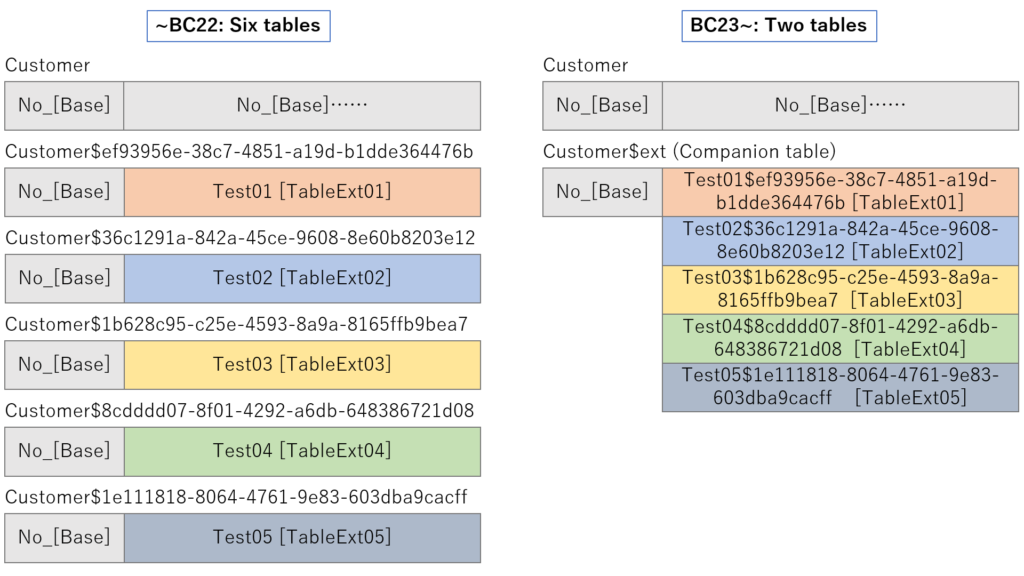
if you open the standard SQL Server database and look for the Customer table, you will see only 2 physical tables:
CRONUS International Ltd_$Customer$437dbf0e-84ff-417a-965d-ed2bb9650972
CRONUS International Ltd_$Customer$437dbf0e-84ff-417a-965d-ed2bb9650972$ext (Companion table)

With this major update (BC29), Microsoft has taken further steps to enhance performance by introducing a new data model for table extensions, where all fields defined on an AL table (including those from extensions) are stored together in the same physical database table.
Taking the Customer table as an example, when you check the database in BC29 (2026 release wave 2), you will find only 1 single physical table. The companion table ($ext) is no longer needed, as all fields from table extensions are fully unified into the base table, eliminating SQL joins entirely.
CRONUS International Ltd_$Customer$437dbf0e-84ff-417a-965d-ed2bb9650972

To make it easier to understand, I created five table extensions to the Customers table.
The contents of one of them:

Then I publish the same five extensions that were just created.

Done.

Note that we still need to publish and install the extension manually.

Done.

At this point, if you check the database again, you’ll see that the number of tables has not increased.

Instead, the number of columns increases. These extended fields are appended directly to the original Customer table, keeping the same field name format as before: FieldName$ExtensionID.


So, no matter how many extensions and table extensions you have, in the actual database, there will always be only one table👏👏👏.

This change does not impact the table model as seen from the AL language, so no code changes are needed from extension/app publishers.
Below is the data retrieved from BCLE. I strongly recommend checking out the video for a direct walkthrough.
What’s new: Server and Database (2026 release wave 2)


Very nice improvement. Give it a try!!!😁
END
Hope this will help.
Thanks for reading.
ZHU

コメント